An R package from the Fritsche Lab at the University of Michigan for reproducible phenome-wide association studies.
Why phewasFlow exists
phewasFlow makes repeated association scans easier to specify, restart, and audit. Its main use case is a prepared phenome analyzed across different exposures, endpoints, or adjustment models, locally or on a cluster.
The PheWAS package offers a broader toolkit, including clinical-code mapping, phenotype construction, regression, plotting, and meta-analysis. Its regression options include Firth regression, parallel execution, and flexible outcome/predictor selection.
phewasFlow adds a focused workflow around analysis-ready data:
| Need | What phewasFlow provides |
|---|---|
| Repeat a declared analysis | Validated specifications for variable types, references, transformations, exclusions, and eligibility thresholds; detailed result records |
| Resume a cluster run | Deterministic shards, input and model fingerprints, reusable completed work, and checks for exact phenotype coverage |
| Keep correction consistent across shards | BH and Bonferroni correction once after combining all successful models in the configured testing family |
| Compare additional covariate adjustment | Base and adjusted models fitted on the same complete-case participants for each phenotype |
| Analyze counts and ordered outcomes | Negative-binomial models with optional log-offsets and proportional-odds ordinal models, alongside Firth and linear regression |
| Retain very small p-values | Upper-tail calculations in log space and log-scale multiple-testing correction, with readable text output |
Very small p-values remain useful for reporting. Calculating a small tail probability by subtracting from one can lose precision or round to zero. phewasFlow evaluates upper tails directly in log space and preserves them through multiple-testing correction. Fields such as p_value_text and neg_log10_p support tables and plots even when a probability is too small for the ordinary numeric p_value field.
Use PheWAS when its integrated phenotype-construction and analysis tools meet your needs. Use phewasFlow when restartable execution, explicit analysis records, matched model comparisons, or these additional outcome models help your project. The packages can work together: construct phenotypes with PheWAS, then pass its participant table and metadata to phewasFlow. See Using PheWAS with phewasFlow and the runnable interoperability and comparison examples.
In the recorded synthetic comparison, coefficients and standard errors agreed to numerical precision, and PheWAS was faster on the tested small workloads. The article includes timing tables and a brief note on numerical differences for very small p-values.
If you use phewasFlow in research, please cite the software and report the version used. See Citation for the reference.
Supported analyses
phewasFlow fits one planned association model across many clinical phenotypes. It supports two common biomedical questions:
| Question | Direction |
|---|---|
| Is one PRS, exposure, or biomarker associated with many outcomes? | phenotypes_as_outcomes |
| Is each phenotype associated with one fixed clinical endpoint? | phenotypes_as_predictors |
Binary outcomes use Firth logistic regression, continuous outcomes use linear regression, counts use negative-binomial regression, and ordinal outcomes use proportional-odds regression. Every requested phenotype receives a result row, including models that were skipped or failed.
Install
Requires R 4.4 or later. From a downloaded or cloned package source directory, install the package and its runtime dependencies:
Rscript -e 'install.packages("remotes", repos = "https://cloud.r-project.org")'
Rscript -e 'remotes::install_local(".", dependencies = NA, upgrade = "never")'
export PATH="$PWD/exec:$PATH"
phewasflow --help
The R functions work without adding the command-line wrapper to PATH. For an optional conda environment using environment.yml:
mamba env create --file environment.yml
mamba activate phewasflow
R CMD INSTALL .
export PATH="$PWD/exec:$PATH"
Reinstall the package after changing the source. Neither installation method requires a cluster account or access to lab data.
Run the simulated example
This example asks whether a standardized simulated polygenic score is associated with a diagnosis, quantitative measurement, healthcare-utilization count, and ordered symptom level while adjusting for age and sex.
Rscript inst/examples/real-data/create-demo-project.R demo-phewas
cd demo-phewas
Rscript run-local.R analysis-forward.yml
The generated project contains 220 simulated participants and uses the same file interface as a real analysis. It validates the inputs, runs two shards, combines the associations, applies multiple-testing correction, and creates:
phewasflow-output/forward/
  results.tsv
  results.rds
  phewas.png
  phewas.pdf
  phewas-volcano.png
  phewas-volcano.pdf
The generated data are for demonstration only, not scientific analysis.
A larger, separately simulated result set illustrates the two standard views. Every point and association shown below is artificial and is not a clinical finding.
Both views keep the same phenotype-group order, colors, legends, y-axis, and annotation style. The Manhattan x-axis orders phenotypes by group; the volcano x-axis shows the fitted effect.
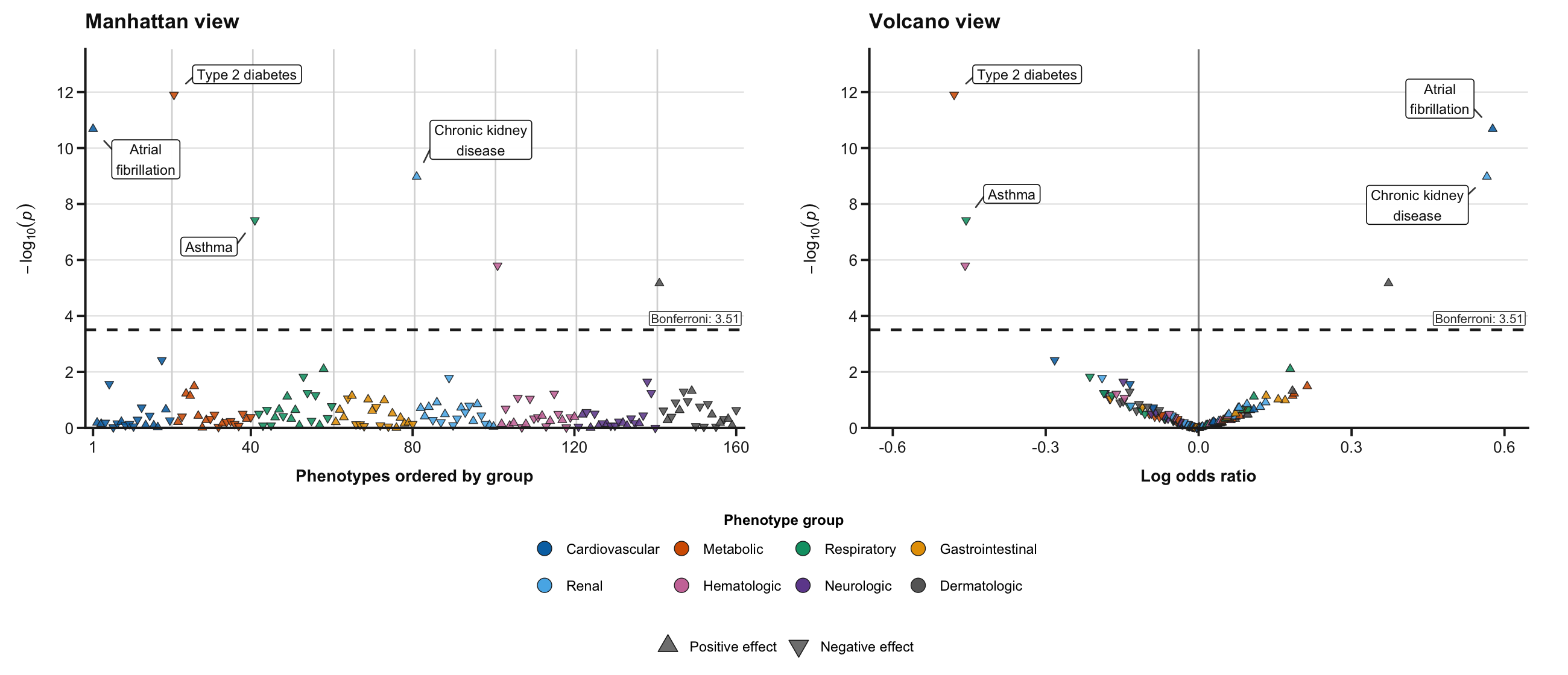
This paired image is only a compact README preview. Analysis runs save the Manhattan and volcano plots as separate files.
Open phewas.png or phewas-volcano.png for a quick review. The PDF versions retain vector text and shapes for publication and post-editing. To try the reverse direction, run:
Use your data
Start from the generated project and replace three inputs:
-
inputs/analysis.rds: one row per participant, with the anchor, covariates, and every scanned phenotype; - the phenotype metadata TSV: one row per scanned phenotype, with
phenotype,description,group,groupnum, andcolor; if thevariable_typecolumn is absent or its value isNAor blank, it defaults tobinary, whileoutcome_typeremains required when phenotypes are outcomes; and - the YAML configuration: analysis direction, anchor, covariates, eligibility thresholds, output directory, and plot settings.
Keep an unavailable phenotype as NA, not as a control. For a scanned binary phenotype, reference defaults to character 0 when it is missing, NA, or blank; declare it when another value is the reference. A fixed binary anchor still requires an explicit anchor_reference in the YAML. Ordinal phenotypes need explicitly ordered levels. Convert special missing-value codes to NA. Store categorical covariates as RDS factors with explicit reference levels, or as K-1 numeric indicators in a delimited file. Each YAML should define one fixed anchor and one testing family. Phenotypes should already implement the intended observation window, case/control definition, and exclusions; phewasFlow fits models but does not derive phenotypes from raw clinical codes.
The real-data workflow vignette source documents the participant-table and metadata requirements with source examples; for the formatted walkthrough, see the rendered article.
Validate and run
Check the files and model specification before fitting:
For a modest analysis, the generated runner performs every stage:
For larger scans, use the SLURM templates after the same analysis succeeds locally on a representative phenotype set.
Review the results
Start with status in results.tsv:
| Status | Meaning |
|---|---|
ok |
Model completed and was included in multiple-testing correction |
skipped |
Eligibility or estimability requirements were not met |
error |
Model preparation, fitting, or convergence failed |
Review reason_code, message, warnings, sample counts, and testing_family_size before interpreting associations. native_effect is a coefficient for continuous outcomes, an odds ratio for binary outcomes, an incidence-rate ratio for counts, and a common odds ratio for ordinal outcomes.
The Bonferroni line is displayed by default. One plot command writes Manhattan and volcano plots as both PNG and PDF. Both use the same ordered phenotype-group legend and visual styling. Volcano coefficients are not directly comparable across different effect measures or measurement units.
Completed matching shards are reusable after an interrupted run. Change the analysis_id and output directory whenever the data, model, thresholds, shard count, or package version changes.
Development
Install the test and documentation dependencies once, then run the tests and source-package checks:
Rscript -e 'remotes::install_deps(dependencies = TRUE, upgrade = "never")'
Rscript -e 'install.packages(c("pkgload", "rcmdcheck", "roxygen2"), repos = "https://cloud.r-project.org")'
R CMD INSTALL .
Rscript -e 'testthat::test_local()'
R CMD build .
R CMD check --no-manual phewasFlow_0.1.0.tar.gz
Reinstall before testing changes so parallel workers load the current package. Building the vignettes requires Pandoc. The GitHub Actions workflow runs package checks on Linux and Windows. See CONTRIBUTING.md for the documentation build and release procedure.
Support
Maintained by Lars Fritsche. Report reproducible problems through GitHub issues, using synthetic examples and sanitized logs. Keep participant data, credentials, and local analysis configuration outside this repository. Even aggregate results and provenance files require review before sharing.
The included examples are simulated; this is research software and is not a clinical or diagnostic tool.
Citation
If you use phewasFlow in research, please cite the software and report the version used in your methods. To obtain the reference and BibTeX entry from R:
The repository also provides citation metadata for GitHub’s Cite this repository feature. Citation is requested as scholarly acknowledgment and is not an additional condition of the MIT license.
License
phewasFlow is distributed under the MIT license. Copyright (c) 2026 Lars Fritsche.