
Python path · All steps · Change language
Lesson 5 of 6
Read changed files and their diffs
A diff shows what changed between two versions of a file. Use Git’s file list to review the whole repair, including files missing from Copilot’s final summary.
- Choose File → Save All, then open Source Control from the Activity Bar.
- Look under Changes.
Mmeans modified,Umeans a new untracked file, andDmeans deleted. If Staged Changes is present, inspect that list too. - Select
plotting/plot_summary.py. Before staging, this diff compares the original committed file with the saved repair. In a side-by-side view, original content is on the left and edited content on the right. - Read the changed sections. Standard themes show removals in red and additions in green, with
−and+markers; color indicates a change, not whether the code is correct. A replacement can appear as both a removal and an addition. - For a different layout, use the diff editor’s More Actions (…) → Diff View → Side by Side or Inline. Inline keeps both versions in one pane and is useful on a narrow screen. In older versions, look for Toggle Inline View in that menu. VS Code diff and staging guide
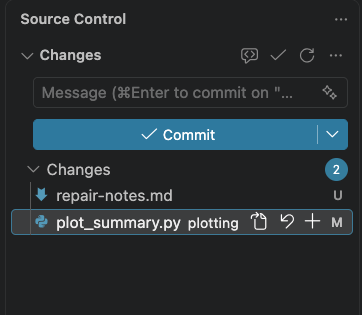
Actual VS Code 1.137.0 on macOS, September 11, 2026. This Python example shows a modified file and an untracked note. The note illustrates U and is not a required exercise file; your list may contain only the plotting file. Select the image for full resolution.
Connect code with the figure
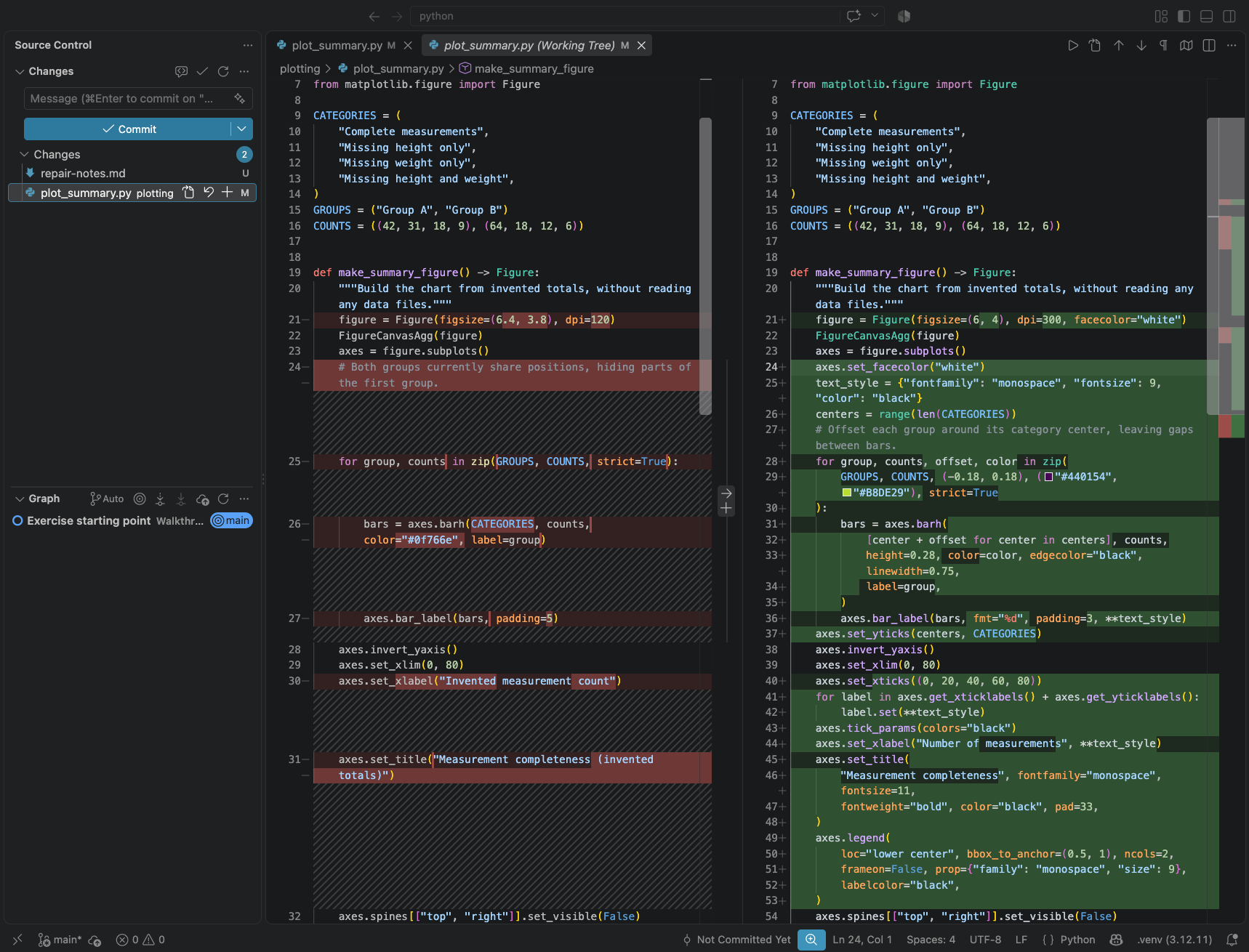
A repair from a disposable learner trial, shown in VS Code 1.137.0 on macOS, September 11, 2026. Read the layout changes across both columns; your repair can differ. Select the image for the full editor view. A colored diff records edits; the checks and your figure review establish whether they work.
Compare the changed positions, margins, fonts, and styling with the repaired PNG. Did the counts, category order, group assignments, command interface, and dependencies stay intact? Open every other changed or new source file. Read new files in full; a new file has no earlier committed version to compare.
The plotting program should still write only the PNG. Copilot authors the alt text separately. The files under runs/ appear in Explorer but stay out of Source Control because .gitignore excludes generated outputs. That is expected; review the PNG and alt text directly.
Saving an edit writes the working file. Staging selects saved changes for the next commit. A commit records that selection in local Git history. Accepting a Copilot edit or reading its change summary does not perform this Git review. VS Code Source Control overview
Review complexity as well as correctness
A working figure can still come with code that is difficult to maintain. Review every new file, dependency, helper, class, or configuration option against the brief. This exercise calls for a plotting repair; a generalized pipeline needs a reason beyond possible future use.
Can you trace the counts to the bars and explain the changed function with Chat closed? Does each abstraction clarify this task or remove real duplication? Has the repair introduced repeated work or large intermediate objects without a need? Do not infer efficiency from passing tests, or prefer dense code just because it is shorter.
If complexity is unnecessary, ask for a simpler proposal before requesting more edits. Preserve the required validation and accessibility features, then repeat both checks and visual review after simplification. Use the proportionality guidance.
Optional second opinion
Ask a labmate, or select Ask in a new Local Chat session and paste:
Review the Python plotting diff against docs/reference/figure-specifications.md,
the checks, and the PNG and alt text in runs/with-fix/. Include changed and
new source files. Flag unnecessary complexity with locations and simpler
alternatives; preserve required validation and accessibility. Report concrete
issues and unperformed checks. Do not
edit, stage, or commit files. If you cannot access a diff or image, say so.
The optional plot-review skill packages that review for clients that support it. Check findings against the actual files before acting on them.
Ready for handoff: you understand each source change you intend to keep. If review leads to another edit, repeat verification and inspect the new diff.